


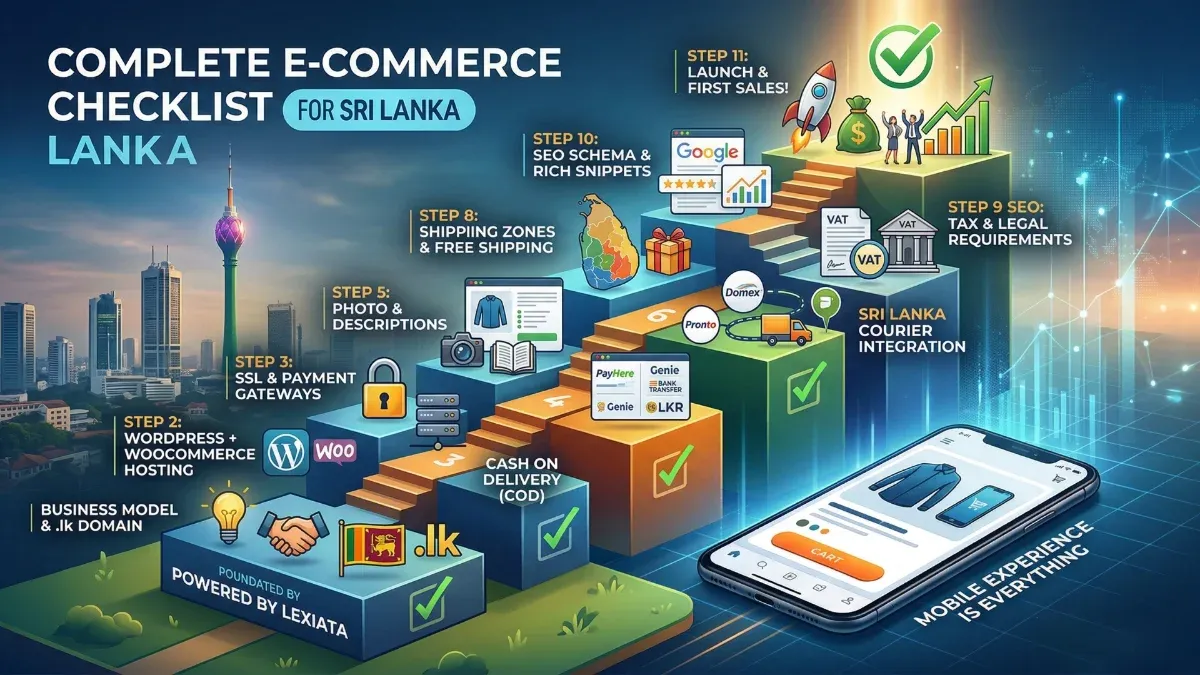
E-Commerce Website Requirements in Sri Lanka: Complete Checklist
Starting an online store in Sri Lanka isn’t as complicated as most people think. But it does require planning. And the difference between a store that actually makes sales and one that just sits there collecting dust usually comes down to getting the basics right from the beginning.
I’ve helped hundreds of business owners in Sri Lanka launch their online stores through Lexiata. Some came to us with a clear plan. Others had nothing but a product idea and a WhatsApp full of customer inquiries they couldn’t keep up with. Regardless of where they started, the ones who succeeded all had one thing in common. They understood what their e-commerce website actually needed before building it.
This guide covers everything. From the technical stuff like payment gateways and hosting to the business side like legal requirements and shipping logistics. Think of it as the checklist I wish someone had given me when I built my first online store years ago.
Before You Build: The Foundation
Let’s start with what you need to sort out before a single line of code is written or a single product is uploaded. Skip this section and you’ll end up rebuilding things later, which costs more time and money than doing it right the first time.
Pick Your Business Model First
This sounds obvious, but you’d be surprised how many people start building a website without being clear on what they’re actually selling and how.
Are you selling physical products that need shipping? Digital products like courses, ebooks, or software? Services that people book online? Or are you building a marketplace where multiple vendors sell through your platform?
Each model has different technical requirements. A clothing store needs size variants, shipping calculations, and return policies. A digital product store needs secure download links and license management. A service business needs booking calendars and appointment scheduling. A marketplace needs vendor dashboards, commission systems, and separate payment splits.
Get clear on your model first. Everything else follows from this decision.
Domain Name and Branding
Your domain name is your online address. In Sri Lanka, you have two main options. A .com domain works well if you plan to sell internationally or want a globally recognized extension. A .lk domain signals that you’re a Sri Lankan business, which can build trust with local customers.
For e-commerce specifically, I’d recommend going with .com unless your business is exclusively targeting Sri Lankan customers. Most of our clients at Lexiata choose .com for their online stores because it gives them flexibility to expand beyond Sri Lanka later.
Keep your domain name short, easy to spell, and easy to remember. Avoid hyphens and numbers if possible. And register it before someone else does. Domain registration in Sri Lanka costs between Rs 3,000 and Rs 5,000 per year for .com, and slightly more for .lk domains.
The Technical Checklist
Now let’s get into what your e-commerce website actually needs from a technical standpoint. I’m going to be specific here because vague advice like “make it user-friendly” doesn’t help anyone.
Platform: WordPress + WooCommerce
For most online stores in Sri Lanka, WordPress with WooCommerce is the best choice. WooCommerce powers over 28% of all online stores globally. It’s free, it’s flexible, and it has a massive ecosystem of plugins for just about anything you need.
Some people ask about Shopify or other hosted platforms. Shopify is great, but it charges monthly fees plus transaction fees on every sale, and the Sri Lankan payment gateway options are limited. With WooCommerce, you own your website completely, you pay no transaction fees to the platform, and you can integrate local payment gateways like PayHere and Dialog Genie directly.
The other option is building a fully custom e-commerce platform from scratch. Unless you have very specific requirements that WooCommerce can’t handle (and a budget of Rs 500,000 or more), this isn’t worth the investment for most Sri Lankan businesses.
Hosting That Can Handle the Load
Your hosting is the engine that powers your online store. Cheap hosting will make your website slow, cause it to crash during traffic spikes, and create security vulnerabilities. For an e-commerce website, this isn’t just annoying. It directly costs you sales.
Here’s what you need from your hosting provider. Fast server response times under 200 milliseconds. At least 99.9% uptime guarantee. Daily automatic backups (because losing your product database would be a nightmare). PHP 8.1 or higher for compatibility with modern WordPress and WooCommerce. Enough storage for your product images and files. And ideally, a server location that’s geographically close to your target customers.
At Lexiata, we provide optimized WordPress hosting specifically configured for WooCommerce stores. But regardless of who hosts your site, don’t cheap out on hosting for an e-commerce project. It’s the one area where spending a little more upfront saves you a lot of headaches later.
SSL Certificate (Non-Negotiable)
If you’re running an online store, SSL isn’t optional. It encrypts the data between your customer’s browser and your server. This means credit card numbers, passwords, and personal information can’t be intercepted.
Beyond security, Google also uses SSL as a ranking factor. And more importantly, modern browsers show a “Not Secure” warning for websites without SSL. If a customer sees that warning while trying to buy something from your store, they’re going to close the tab immediately.
Most good hosting providers include a free SSL certificate. Make sure yours does. And make sure it’s properly configured so your entire website loads over HTTPS, not just the checkout page.
Payment Gateways for Sri Lanka
This is the section most people are most confused about, so let me break it down clearly.
PayHere
PayHere is currently the most popular payment gateway for online stores in Sri Lanka. It supports Visa, MasterCard, American Express, and local bank transfers. Setting up PayHere involves registering a merchant account, submitting your business documents for verification, and integrating it with WooCommerce through their official plugin.
PayHere charges a transaction fee on each sale, typically around 3% for card payments. The verification process usually takes 3 to 7 business days. Once verified, customers can pay using their cards, and the money gets deposited to your bank account after a settlement period.
Dialog Genie / PayZy
Dialog’s payment solutions are another option for Sri Lankan businesses. These work well for customers who prefer mobile payments or don’t have credit cards. Integration with WooCommerce is straightforward through available plugins.
Bank Transfers
Many Sri Lankan customers still prefer direct bank transfers, especially for higher-value purchases. Your e-commerce website should have an option for manual bank transfer orders. The customer places the order, transfers the money, and you confirm the payment manually before shipping.
This isn’t as automated as card payments, but it’s important for the Sri Lankan market where not everyone is comfortable with online card payments yet.
Cash on Delivery (COD)
Whether you love it or hate it, Cash on Delivery is still a significant payment method in Sri Lanka. Many customers, especially first-time online shoppers, prefer to pay when they receive the product.
COD does come with risks. Customers sometimes refuse delivery, which means you pay shipping costs for nothing. My advice is to offer COD but with some safeguards. A small advance payment or deposit. Order confirmation via phone call before shipping. And clear COD policies on your website.
International Payments
If you’re selling to customers outside Sri Lanka, you’ll need to accept international payments. PayHere handles this for most currencies. You can also consider Stripe (available in Sri Lanka through certain business structures) or PayPal business accounts for international transactions.
Make sure your website supports multiple currencies if you’re targeting international customers. WooCommerce has plugins that handle currency switching based on the visitor’s location.
Product Management Essentials
Your product pages are where buying decisions happen. Getting them right is critical.
Product Photography
This is where a lot of Sri Lankan online stores fall short. Blurry phone photos with messy backgrounds don’t inspire confidence. You don’t need a professional photographer for every product, but you do need clean, well-lit images that accurately represent what you’re selling.
Use a plain white or light background. Make sure the lighting is even with no harsh shadows. Take photos from multiple angles. If you’re selling clothing, show it on a person, not just laid flat. For electronics, show the product in use, not just in the box.
Each product should have at least 3 to 5 images. WooCommerce supports product image galleries natively, so use them.
Product Descriptions That Sell
“Nice shirt, good quality, buy now” is not a product description. Your descriptions need to answer the questions customers actually have. What material is it made from? What are the exact dimensions? How should they care for it? What makes it different from similar products?
Write descriptions that are both informative and persuasive. Include the practical details (size, weight, material, color options) alongside the benefits (why this product will make the customer’s life better). And don’t forget to include relevant keywords naturally for SEO.
Product Variants and Inventory
If you sell products with different sizes, colors, or configurations, WooCommerce handles this through variable products. Set up your variants properly from the start. Each variant should have its own stock quantity, price (if different), and sometimes its own image.
Inventory management might seem unnecessary when you have 20 products. But as your store grows to 200 or 2,000 products, having a clean inventory system from the beginning saves you from chaos later.
Product Categories and Filters
Organize your products into clear, logical categories. If you sell clothing, categories might be Men, Women, Kids, then subcategories like Shirts, Pants, Accessories. If you sell electronics, organize by product type, brand, or price range.
Add filtering options so customers can narrow down products by size, color, price range, brand, or other relevant attributes. On a mobile phone, where screen space is limited, good filters become even more important. Nobody wants to scroll through 500 products to find what they’re looking for.
Shipping and Delivery Setup
Getting the shipping right is just as important as getting the website right. A beautiful website means nothing if customers don’t receive their orders on time and in good condition.
Shipping Zones and Rates
In Sri Lanka, you’ll want to set up at least two or three shipping zones. Colombo and suburbs (usually cheapest and fastest delivery). Other major cities like Kandy, Galle, Jaffna. And rural areas (which typically cost more and take longer).
You can offer flat rate shipping (one price regardless of location), free shipping above a certain order value (which encourages larger orders), or calculated shipping based on weight and distance.
Free shipping is a powerful sales driver. If your margins allow it, consider offering free shipping for orders above a certain amount. Even something like “Free delivery on orders over Rs 5,000” can significantly increase your average order value.
Courier Integration
For Sri Lankan e-commerce businesses, the main courier services include Domex, Pronto, PickMe Flash, Kapruka Delivery, and Sri Lanka Post. Some of these offer API integration with WooCommerce, which means orders can be automatically sent to the courier system, tracking numbers can be generated, and customers can track their deliveries in real time.
At Lexiata, we’ve built custom courier integrations for clients, including a complete WooCommerce plugin for Domex that handles automatic order dispatch, label generation, and tracking updates. This kind of automation saves hours of manual work as your order volume grows.
Packaging
Don’t underestimate packaging. The unboxing experience is part of your brand. Invest in packaging that protects the product during transit and looks presentable when the customer opens it. Include a thank-you card, care instructions, or a discount code for the next purchase. Small touches like these build loyalty and encourage repeat orders.
Legal Requirements in Sri Lanka
Running an online store in Sri Lanka comes with certain legal obligations. Ignoring these can get you into trouble.
Business Registration
You can start selling online as a sole proprietor, but as your business grows, registering as a company provides legal protection and credibility. Register with the Department of Registrar of Companies if you’re setting up a private limited company, or with the relevant Provincial Council for a sole proprietorship or partnership.
You’ll also need to register for tax purposes. If your annual turnover exceeds the VAT threshold (currently Rs 80 million), you need to register for VAT. Even below this threshold, registering with the Inland Revenue Department is advisable.
Terms and Conditions
Every e-commerce website needs clearly written Terms and Conditions. This page should cover what happens when a customer places an order, payment terms, delivery timelines, what constitutes acceptance of the order, intellectual property rights, and limitation of liability.
Don’t copy someone else’s Terms and Conditions. They won’t be tailored to your business and might not even be legally valid in Sri Lanka. Invest in having proper terms drafted, or at minimum, customize a template for your specific business model.
Privacy Policy
If you collect customer data (and you will, because every online store does), you need a Privacy Policy. This should explain what data you collect, why you collect it, how you store it, who you share it with, and how customers can request their data be deleted.
With increasing awareness of data privacy globally, having a transparent Privacy Policy isn’t just a legal requirement. It builds trust with your customers.
Refund and Return Policy
This is the one most Sri Lankan online stores get wrong. Having a clear, fair refund policy actually increases sales because it reduces the perceived risk of buying online.
State clearly what products can be returned, the timeframe for returns (7 days, 14 days, 30 days), who pays for return shipping, how refunds are processed (original payment method, store credit, or exchange), and any conditions for the return (unworn, original packaging, etc.).
Display your refund policy prominently. Don’t hide it in a footer link that nobody ever clicks. Put it on your product pages, your checkout page, and in your FAQ section.
SEO for E-Commerce
If people can’t find your store on Google, it doesn’t matter how beautiful it looks or how good your products are. E-commerce SEO has some specific requirements that go beyond basic website SEO.
Product Page SEO
Every product page needs a unique title tag that includes the product name and a relevant keyword. Write a unique meta description for each product, not a generic one copied across all products. Use descriptive, keyword-rich URLs like /product/mens-cotton-shirt-blue/ instead of /product/?id=1234.
Your product images should have descriptive alt tags. Instead of “IMG_4523.jpg,” use “mens-blue-cotton-casual-shirt-front-view.jpg.” This helps with Google Image search, which is a surprisingly significant traffic source for e-commerce websites.
Category Page Optimization
Category pages are often overlooked for SEO, but they can rank for valuable keywords. Add unique descriptive text to each category page. Not just a list of products, but actual content explaining what the category contains and why someone should buy from you.
For example, your “Men’s Shirts” category page could have a short paragraph about your shirt collection, the materials you use, size options available, and care instructions. This gives Google content to index and helps your category page rank for relevant searches.
Schema Markup
Product schema markup tells Google detailed information about your products, including price, availability, reviews, and ratings. When properly implemented, this can result in rich snippets in search results, showing star ratings, price, and stock status directly in Google. This significantly improves click-through rates.
WooCommerce with Rank Math SEO handles much of this automatically, but verify that your schema is correctly implemented using Google’s Rich Results Test tool.
Site Speed
E-commerce websites tend to be heavier than standard websites because of all the product images, scripts, and functionality. Every second of load time reduces conversions. Studies consistently show that a one-second delay in page load time can reduce conversions by 7%.
Optimize your images before uploading (use WebP format when possible). Enable browser caching. Use a CDN like Cloudflare to serve your content from servers closer to your customers. Minify CSS and JavaScript. And choose hosting that’s fast enough to handle your store.
Essential Pages Every Online Store Needs
Beyond your product pages, your e-commerce website needs several supporting pages to function properly and build trust with customers.
Your homepage should clearly communicate what you sell, who you are, and why someone should buy from you. Feature your best-selling or newest products prominently. Include trust signals like customer reviews, payment security badges, and your contact information.
A dedicated About Us page tells your brand story. People buy from people, especially in Sri Lanka where personal trust matters. Share who you are, why you started the business, and what makes your products special.
Your Contact page should include every way a customer can reach you. Phone number, WhatsApp (this is huge in Sri Lanka), email address, physical address if you have one, and a contact form. If customers can’t easily get in touch with questions, they’ll buy from someone else.
A comprehensive FAQ page answers common questions before customers need to ask them. Shipping times, return policies, payment methods, sizing guides. Every question you answer on this page is one less WhatsApp message you need to respond to.
Separate pages for your Shipping Policy, Return Policy, Privacy Policy, and Terms and Conditions. These aren’t exciting pages, but they’re essential for both legal compliance and customer trust.
Mobile Experience Is Everything
In Sri Lanka, the majority of online shopping happens on mobile phones. If your e-commerce website doesn’t work perfectly on a phone, you’re losing the majority of your potential customers.
This goes beyond just “being responsive.” The entire shopping experience needs to be designed for thumbs and small screens. Product images should be swipeable. The add-to-cart button should be easy to tap without accidentally hitting something else. The checkout form should be simple with large input fields. Payment should work smoothly on mobile browsers.
Test your checkout process on an actual phone. Not just in the browser’s mobile simulation mode, but on a real device. Add a product to the cart, go through the entire checkout, and enter payment details. If anything feels awkward or frustrating, fix it before launch.
Security Essentials
An e-commerce website handles sensitive customer data. Credit card numbers, personal addresses, phone numbers, email addresses. You have a responsibility to protect this information.
SSL certificate is the absolute minimum. Beyond that, keep WordPress, WooCommerce, and all plugins updated to the latest versions. Use strong passwords and enable two-factor authentication for admin accounts. Set up a web application firewall (Cloudflare’s free plan provides basic WAF protection). Run regular malware scans. Set up automated daily backups so you can restore your site quickly if anything goes wrong.
Don’t store credit card data on your server. Payment gateways like PayHere handle this for you, which means sensitive card data never touches your website.
What Does All This Cost?
Let me give you a realistic budget breakdown for launching an e-commerce website in Sri Lanka in 2026.
For a basic online store with up to 50 products, standard payment gateway integration, and essential features, you’re looking at Rs 64,900 to Rs 100,000 for design and development. Add Rs 8,000 to Rs 15,000 per year for hosting, and Rs 3,000 to Rs 5,000 per year for your domain name. SSL is usually included with hosting.
For a mid-range store with 100 to 500 products, advanced features like wishlists, size guides, advanced filtering, and courier integration, expect Rs 100,000 to Rs 200,000 for development.
For a large-scale or multi-vendor marketplace, prices start around Rs 200,000 and can go significantly higher depending on complexity, custom features, and integration requirements.
These prices include design, development, hosting setup, SSL, payment gateway integration, basic SEO, and training. They don’t include ongoing costs like payment gateway transaction fees, courier service charges, or marketing expenses.
At Lexiata, our e-commerce packages start at Rs 64,900 for a complete online store with payment integration, product management, and all the essentials covered in this checklist. We also offer custom solutions for businesses with specific requirements that go beyond standard packages.
The Launch Checklist
Before you go live, run through this final checklist. I’ve seen stores launch with embarrassing issues that could have been caught with a simple review.
Test every payment method. Place a real order (you can refund yourself) to make sure the entire flow works from adding to cart through to payment confirmation and order email.
Check all automated emails. Order confirmation, shipping notification, password reset, account creation. Make sure they look professional and contain accurate information.
Verify your stock quantities are correct. Nothing frustrates a customer more than ordering something that turns out to be out of stock.
Test the mobile experience thoroughly. As I mentioned earlier, do this on an actual phone, not just a desktop simulator.
Submit your sitemap to Google Search Console. This tells Google your store exists and helps your product pages get indexed faster.
Set up Google Analytics and conversion tracking. Without analytics, you’re flying blind. You need to know where your visitors come from, which products they view, where they drop off in the checkout process, and what your actual conversion rate is.
Make sure your contact information is visible and accurate. Phone number, WhatsApp, email, physical address if applicable.
Double-check all legal pages. Terms and Conditions, Privacy Policy, Refund Policy, Shipping Policy. These should all be in place before you accept your first order.
Getting Your First Sales
Building the website is only half the battle. Getting your first customers is the other half.
Start with people who already know you. Share your store on your personal and business social media. Send a WhatsApp broadcast to your existing contacts. If you’ve been selling through Facebook or Instagram, redirect those customers to your new website.
Set up a Google Business Profile and link it to your website. This helps with local search visibility, especially when people search for products or services in your area.
Consider running Facebook and Instagram ads targeted to Sri Lankan audiences. Even a small budget of Rs 500 to Rs 1,000 per day can drive meaningful traffic to your store when the targeting is right.
Encourage reviews from your first customers. Positive reviews build social proof and help future customers feel confident about buying from you.
And be patient. Most online stores don’t explode with sales on day one. It takes time to build traffic, trust, and a customer base. Stay consistent, keep improving your product pages, publish helpful content, and the results will follow.
Frequently Asked Questions
Do I need a business registration to sell online in Sri Lanka? You can technically start selling as an individual, but registering your business provides legal protection, makes it easier to open merchant payment accounts, and builds customer trust. As your revenue grows, registration becomes practically necessary for tax compliance.
Which payment gateway is best for Sri Lanka? PayHere is the most widely used and supports all major card types plus local bank transfers. For most new online stores in Sri Lanka, PayHere is the safest starting choice. You can always add additional payment methods later as your business grows.
How many products do I need to launch? There’s no minimum. Some successful stores launch with just 10 to 20 products. It’s better to launch with a smaller, well-presented catalog than to wait months trying to photograph and list 500 products. You can always add more products after launch.
Should I offer Cash on Delivery? It depends on your business model and risk tolerance. COD can increase sales because many Sri Lankan customers prefer it, but it also increases the risk of refused deliveries. A good middle ground is offering COD with a small non-refundable booking fee.
How do I handle returns and refunds? Have a clear, written policy and display it prominently on your website. Process refunds promptly when they’re legitimate. Returns are a normal part of e-commerce, not a problem to be avoided. Handling them professionally actually builds customer loyalty and trust.
Can I sell internationally from Sri Lanka? Yes. WooCommerce supports international shipping, multiple currencies, and international payment processing. Start with your local market, get your operations running smoothly, and then expand internationally when you’re ready.